
 Printing Guides
What Does Collate Mean When Printing Pages?
Collate means printing pages in the correct order. It is a time-saving printing process for documents like letters, notes, presentations, and manuals. There are two types of printing: collated and uncollated. Both options can be adjusted in the printer’s settings.
If beginners want to know more about the meaning of collate in printing, explore our article to learn about collating sheets in printing, collated and uncollated printing, its meaning, examples of collating, and group printing.
What Is Collate in Printing?
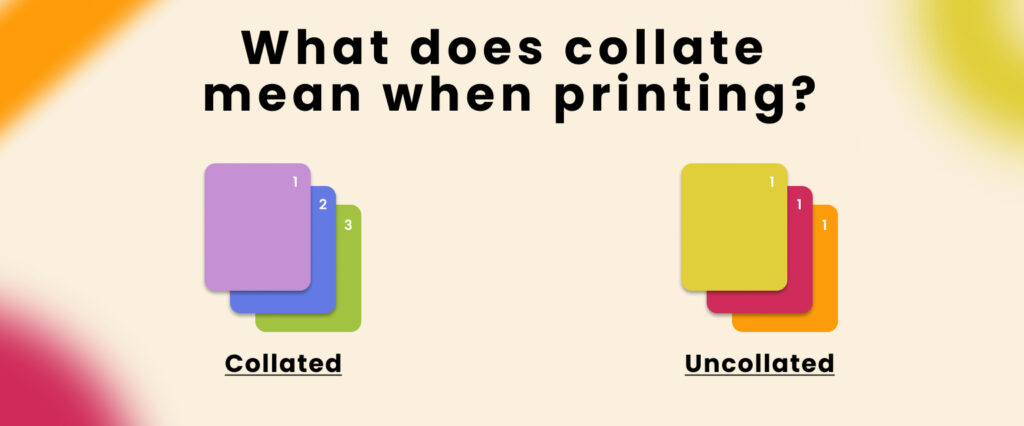
Collate is the process of printing documents in sequential order, like 1, 2, 3, 4, rather than printing them as 1, 1, 1, 2, 2, 2, 3, 3, 3, 4, 4, 4. It provides an accurate and convenient way to print multiple copies of multi-page documents.
What does collate sheets mean when printing? In collated printing, the sheets are printed and arranged in the correct sequence.
Collate Printing Example
For example, if you want to print multiple copies of a presentation, you can use the collate option to print each complete set in the sequence of 1, 2, 3, 4. This makes the printed documents easier to review, distribute, or bind.
What Does Collate Mean When Printing Multiple Copies?
Collate means arranging multiple copies of a document into complete sets. For example, if a document has three pages and you need two copies, collated printing produces:
1, 2, 3 → 1, 2, 3
Instead of:
1, 1 → 2, 2 → 3, 3
Contact our Luca Packaging team if you need help with customized printing and packaging.
Collated vs. Uncollated Printing
What Is Collated Printing?
Collated printing means pages are arranged into complete sets in sequential order, such as 1, 2, 3, 4. The collate option is useful when printing multiple copies of long documents.
What Is Uncollated Printing?
Uncollated printing means multiple copies of each individual page are printed together. For example, if you need four copies of a four-page document, the printer may produce:
1, 1, 1, 1 → 2, 2, 2, 2 → 3, 3, 3, 3 → 4, 4, 4, 4
This option can be useful when you need bulk copies of individual pages.
Benefits of Collated Printing
- Used for multi-page documents
- Useful when printing multiple copies of multiple-page documents
- Keeps pages in an organized order
- Suitable for reports, presentations, and manuals
- Saves time when assembling documents
Benefits of Uncollated Printing
- Useful for printing multiple copies of individual pages
- Suitable when pages need to be separated or grouped later
- Can be useful for tickets, forms, and similar materials
- Provides individual page groups
- May require additional manual arrangement for complete documents
When Should You Print Collated?
You should use the collate option in the following situations:
- When you want to print multiple copies of a document in sequence
- When printing presentations, reports, manuals, or official documents
- When you want to reduce the need for manual page arrangement
- When you are printing several complete document sets
- When you want to save time when organizing printed pages
Importance of Collate Printing
Collate printing plays an important role in high-volume document printing. It is commonly used in commercial print shops, offices, educational institutions, and other environments where multiple copies of multi-page documents are required.
By automatically arranging pages in the correct sequence, collated printing can make document preparation more efficient and reduce the need for manual sorting.
Collated vs. Uncollated (Group) Printing
Collated printing produces complete document sets in sequential order. Uncollated or group printing produces multiple copies of the same page together.
For example, if you need five copies of a three-page document:
Collated:
1, 2, 3 → 1, 2, 3 → 1, 2, 3 → 1, 2, 3 → 1, 2, 3
Uncollated/Grouped:
1, 1, 1, 1, 1 → 2, 2, 2, 2, 2 → 3, 3, 3, 3, 3
The best option depends on how you want to organize and use the printed pages.
Why Do We Use Collate Printing?
We use collated printing when we need multiple copies of a document arranged in the correct sequence. Instead of manually sorting each page after printing, the printer organizes the pages into complete sets.
This can reduce manual work and make the printing process more efficient, especially when printing multi-page documents in larger quantities.
How Does Collate Printing Work?
Collation can be performed manually or automatically. The method depends on the printer, software, and number of copies being produced.
Manual Collation
Manual collation refers to arranging printed pages into the correct order by hand, one set at a time. This method can produce the same final result as automated collation, but it requires more time and effort.
Manual collation may be suitable for small print runs where only a few copies need to be arranged.
Automated Collation
Automated collation uses printer software or printing equipment to arrange pages automatically. The printer recognizes the document’s page sequence and produces complete sets according to the selected print settings.
This method is generally faster and reduces the amount of manual page sorting required.
Troubleshooting Collate Printing Issues
If the collate option is not working as expected, check the following:
- Make sure the paper is correctly placed in the printer tray.
- Check the printer settings and confirm that the collate option is enabled.
- If you experience missing lines or printing errors, restart the printer and check for available driver or software updates.
- Use appropriate, high-quality paper for better print results.
- If you are printing a large number of copies, consider printing in smaller batches to reduce paper waste.
- Double-check the page order and document content before starting a large print job.
- Avoid overfilling the paper tray because this can increase the risk of paper jams.
- Restart or update the printer and print drivers if the problem continues.
Conclusion
Understanding the meaning of collate in printing can help you choose the right printing option for your documents. Collated printing arranges pages into complete sets, while uncollated printing groups copies of the same page together.
For multi-page documents and multiple copies, collated printing can save time and reduce the need for manual page sorting.
If you need multi-page document printing or customized packaging solutions, Luca Packaging can help with customized printing and packaging requirements.
FAQs
Is Collate Printing Double-Sided?
No. Collating and double-sided printing are two different printer settings. Collating controls the order in which pages are arranged, while double-sided printing controls whether content is printed on both sides of a sheet.
What Does Collate Mean When Printing 2 Copies?
When printing two copies of a multi-page document with collate enabled, the printer completes the first set before printing the second set.
For example:
1, 2, 3 → 1, 2, 3
What Does Collated Mean in Printing?
In printing, collated means arranging pages in sequential order to create complete document sets. For example, a three-page document printed twice would be produced as 1, 2, 3 followed by 1, 2, 3.
Can PDF Files Be Collated Automatically?
Yes. Many PDF readers and printer drivers provide a collate option when printing multiple copies. The exact setting depends on the software and printer you are using.
How Do You Enable and Disable Collating?
You can usually enable or disable collating from the print settings. When printing multiple copies, look for the Collate checkbox or option. Enable it when you want complete document sets and disable it when you want copies of each page grouped together.
